> ## Documentation Index
> Fetch the complete documentation index at: https://docs.canadava.com/llms.txt
> Use this file to discover all available pages before exploring further.
# Using the Jumpseat System
> Reposition your pilot to any airport in the vACA route network instantly using the free Jumpseat system in Pilot Hub.
## What is the Jumpseat System?
The Jumpseat system allows pilots to reposition to any airport in the Virtual Air Canada Airline route network without having to fly there first. This feature simulates a pilot traveling as a passenger on commercial flights to reach a new starting point for their next flight assignment.
Using the Jumpseat system is completely free and can be used as often as needed to reposition yourself across the network.
## When to Use the Jumpseat
There are several scenarios where using the Jumpseat system makes sense:
Change your starting location to an airport you prefer flying from
Reposition after landing at a destination where you don't want to start your next flight
Quickly join other pilots for special events or group flights departing from specific airports
Position yourself at airports that offer routes you haven't flown before
## How to Use the Jumpseat
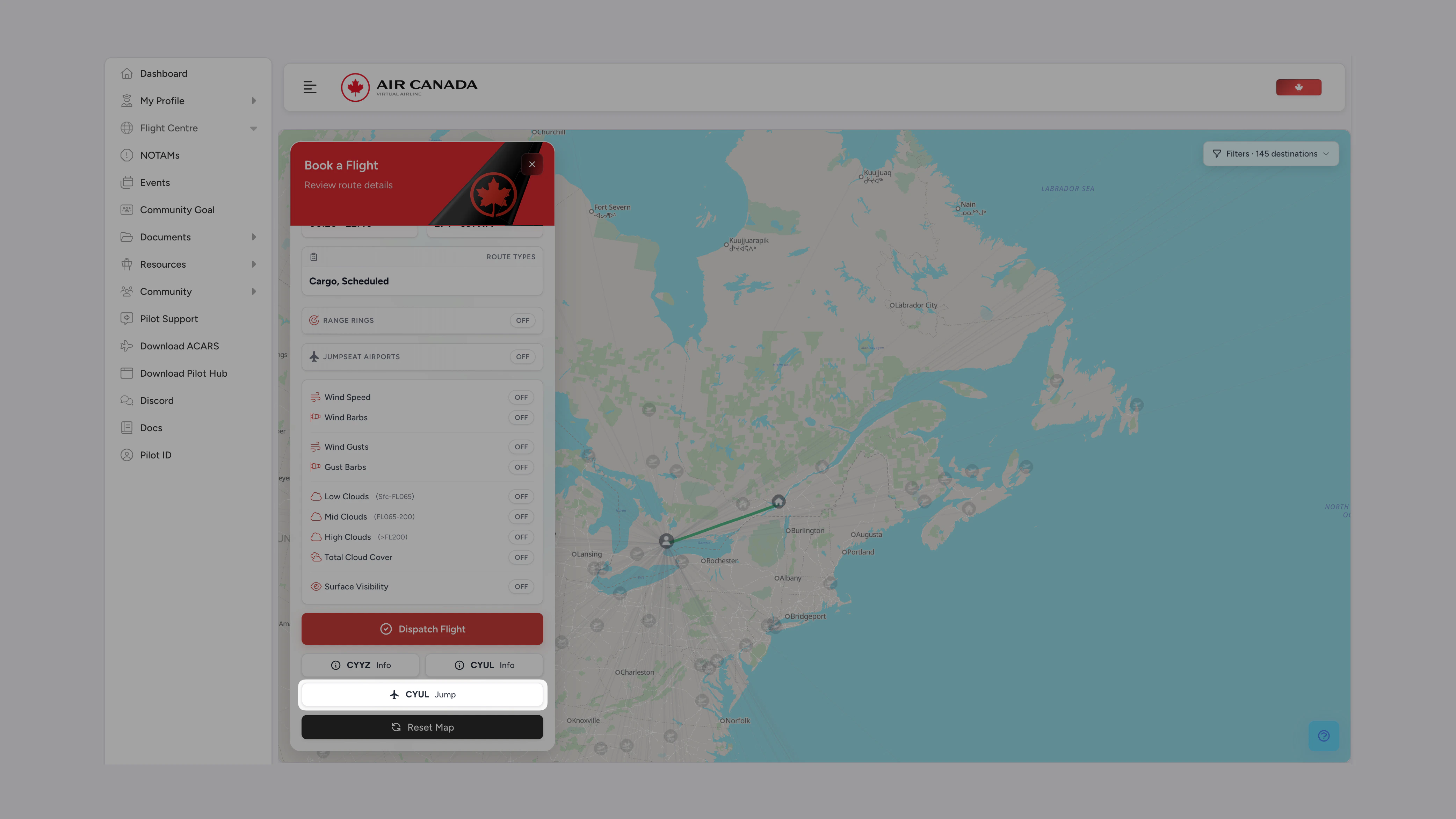
In Pilot Hub, open the **Book a Flight** sidebar and select the airport you want to reposition to.
Major hubs typically offer more flight options, so jumpseating to a hub airport can provide more route choices for your next flight.
Scroll down inside the **Book a Flight** sidebar until you reach the action buttons at the bottom.
Click the jumpseat button next to your selected airport code. Your pilot is repositioned instantly, with no confirmation step.
 ## Jumpseat Restrictions
While the Jumpseat system offers flexibility, some limitations apply:
You cannot use the Jumpseat system if you have an active flight assignment. You must first:
* Complete your current flight assignment, or
* Cancel your current booking through the Pilot Hub
You can jumpseat to any airport in the vACA network regardless of your pilot rank. This includes:
* All Air Canada mainline destinations
* Air Canada Express (Jazz) destinations
* Air Canada Rouge destinations
* Seasonal destinations (even when out of season)
## Best Practices
Use the jumpseat strategically to position yourself for interesting route options or to complete specific collections of routes
Consider jumpseating to major hubs like Toronto (YYZ), Montreal (YUL), or Vancouver (YVR) for maximum flight options
Check upcoming events in the community calendar and use the jumpseat to position yourself for participation
Use the jumpseat to explore different parts of the route network you might not normally fly to
## FAQ
No, using the jumpseat does not count as a flight, earn flight hours, or contribute to your rank progression. It is simply a positioning tool.
No, you can only jumpseat to airports that are part of the Virtual Air Canada Airline route network.
There is no limit to how frequently you can use the jumpseat feature. You're free to reposition as often as needed.
## Need Help?
If you encounter any issues using the jumpseat system, our support team is available to assist you.
Get answers to your questions in our active Discord community
Contact our support team for personalized assistance
## Jumpseat Restrictions
While the Jumpseat system offers flexibility, some limitations apply:
You cannot use the Jumpseat system if you have an active flight assignment. You must first:
* Complete your current flight assignment, or
* Cancel your current booking through the Pilot Hub
You can jumpseat to any airport in the vACA network regardless of your pilot rank. This includes:
* All Air Canada mainline destinations
* Air Canada Express (Jazz) destinations
* Air Canada Rouge destinations
* Seasonal destinations (even when out of season)
## Best Practices
Use the jumpseat strategically to position yourself for interesting route options or to complete specific collections of routes
Consider jumpseating to major hubs like Toronto (YYZ), Montreal (YUL), or Vancouver (YVR) for maximum flight options
Check upcoming events in the community calendar and use the jumpseat to position yourself for participation
Use the jumpseat to explore different parts of the route network you might not normally fly to
## FAQ
No, using the jumpseat does not count as a flight, earn flight hours, or contribute to your rank progression. It is simply a positioning tool.
No, you can only jumpseat to airports that are part of the Virtual Air Canada Airline route network.
There is no limit to how frequently you can use the jumpseat feature. You're free to reposition as often as needed.
## Need Help?
If you encounter any issues using the jumpseat system, our support team is available to assist you.
Get answers to your questions in our active Discord community
Contact our support team for personalized assistance